Ports and Addresses
The single reference for what plugs in where. Both switch models are cabled the same way; on the upgraded ECS5512FP, ports 11-12 stay free.
Switch ports
All RJ45 ports supply PoE by default. Port 8 is the recommended port for the gateway or site uplink.
- NUC PRO
- HR-01-2
| Port | Type | Connected to | Via |
|---|---|---|---|
| 1 | RJ45 | Node 1, cable 1A | Keystone 1 |
| 2 | RJ45 | Node 1, cable 1B | Keystone 2 |
| 3 | RJ45 | Node 2, cable 2A | Keystone 3 |
| 4 | RJ45 | Node 2, cable 2B | Keystone 4 |
| 5 | RJ45 | Node 3, cable 3A | Keystone 5 |
| 6 | RJ45 | Node 3, cable 3B | Keystone 6 |
| 7 | RJ45 | HiveSight SBC (powered by PoE from this port) | Keystone 7 |
| 8 | RJ45 | Gateway (through the PoE splitter) or site uplink | Direct |
| 9 | SFP+ | PDU network | Keystone 8 |
| 10 | SFP+ | Free (transceiver fitted) |
Each NUC has two 2.5GbE ports, A on top and B below, both connected.
| Port | Type | Connected to | Via |
|---|---|---|---|
| 1 | RJ45 | Node 1, 2.5GbE backup link (cable 1B) | Keystone 2 |
| 2 | RJ45 | Node 2, 2.5GbE backup link (cable 2B) | Keystone 4 |
| 3 | RJ45 | HiveSight SBC (powered by PoE from this port) | Keystone 5 |
| 4 | RJ45 | PDU network | Keystone 6 |
| 5-7 | RJ45 | Free | |
| 8 | RJ45 | Gateway (through the PoE splitter) or site uplink | Direct |
| 9 | SFP+ | Node 1, 10G primary link (cable 1A) | Keystone 1 |
| 10 | SFP+ | Node 2, 10G primary link (cable 2A) | Keystone 3 |
The two nodes are also linked to each other by a 10G DAC cable, outside the switch. Each node's second 2.5GbE port is unused.
Network diagram
Shown with the standard switch. The upgraded switch has 2 more SFP+ ports; everything else is connected the same way.
- NUC PRO
- HR-01-2
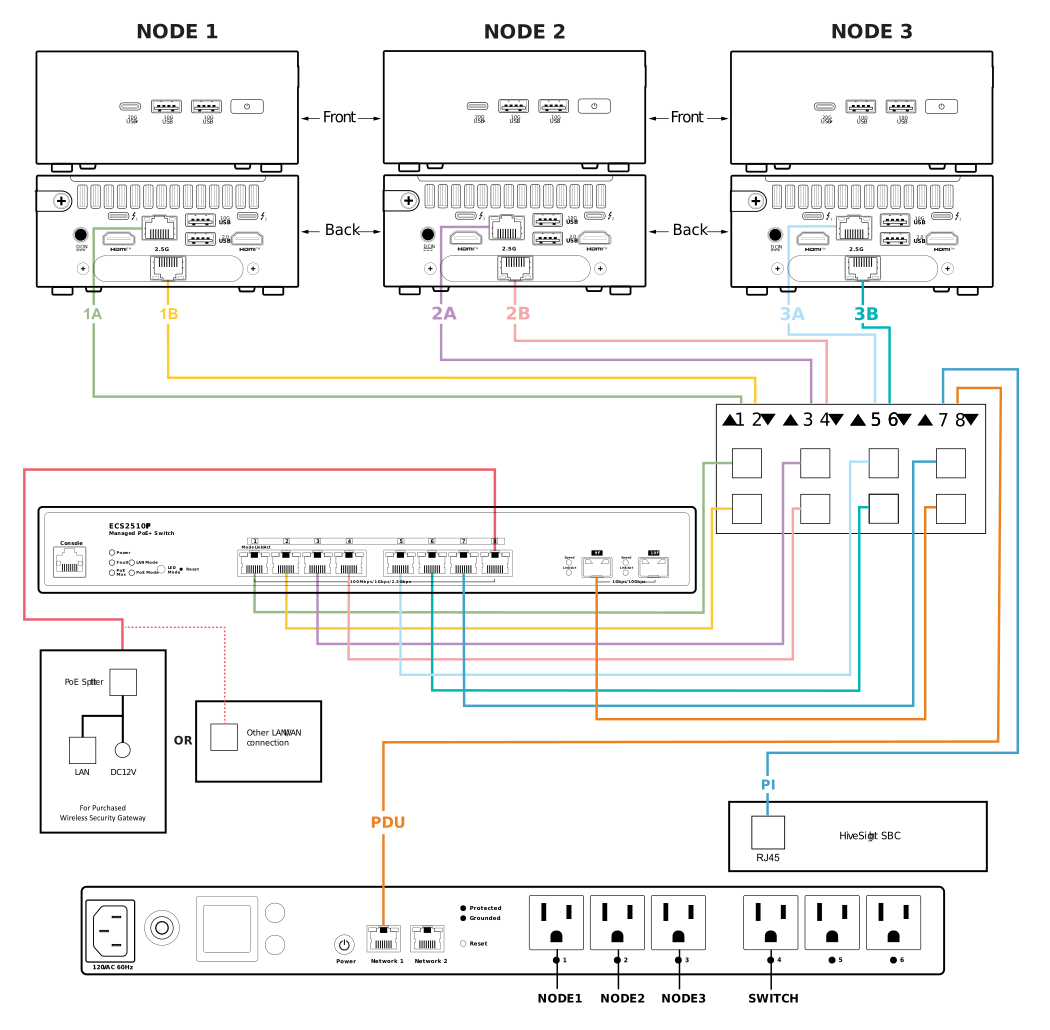
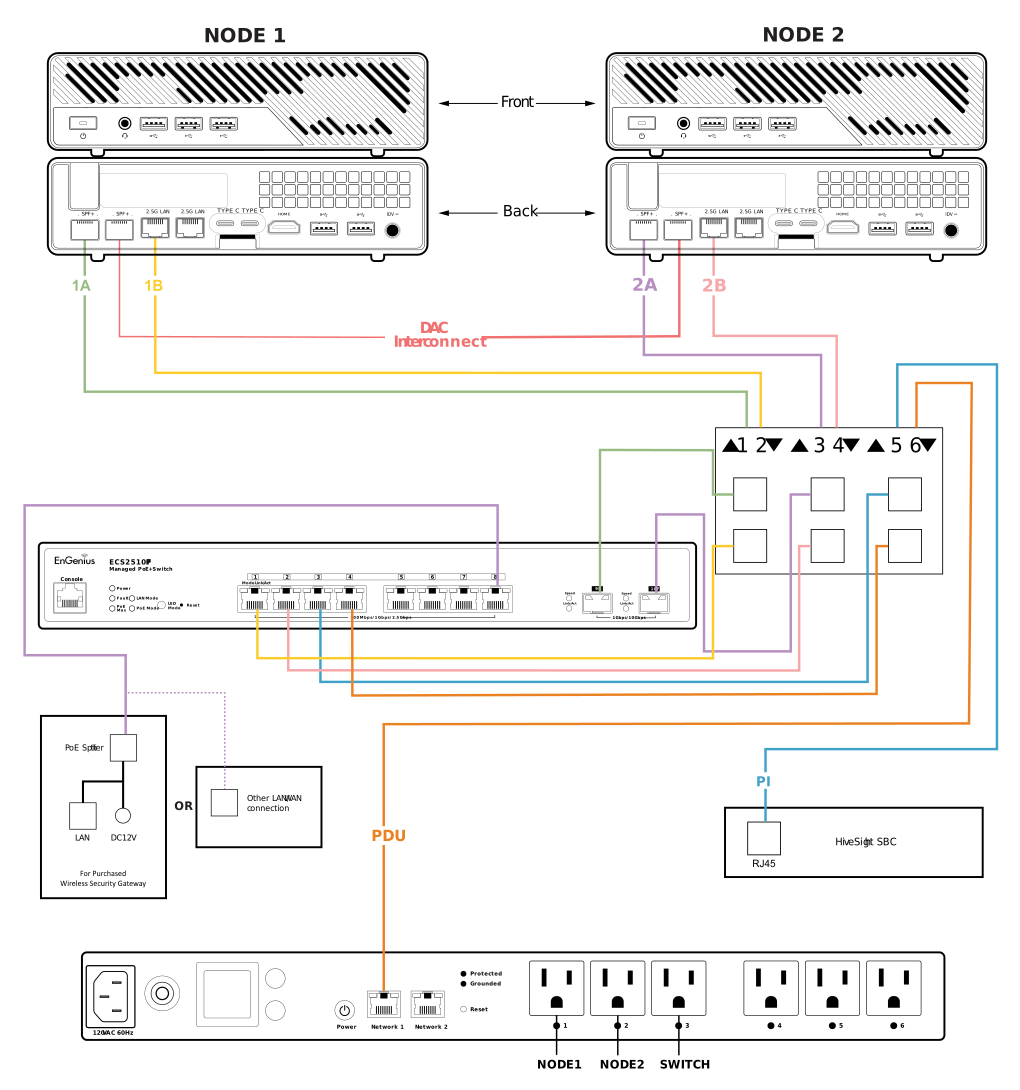
PDU outlets
- NUC PRO
- HR-01-2
| Outlet | 1 | 2 | 3 | 4 | 5 | 6 |
|---|---|---|---|---|---|---|
| Powers | Node 1 | Node 2 | Node 3 | Switch | Free | Free |
| Outlet | 1 | 2 | 3 | 4 | 5 | 6 |
|---|---|---|---|---|---|---|
| Powers | Node 1 | Node 2 | Switch | Free | Free | Free |
The HiveSight SBC and a PoE gateway get power from the switch.
Addresses and logins
Your own addresses and logins are on your Access & Configuration Sheet. These are the defaults when no DHCP is available:
| Device | Fallback address | Login |
|---|---|---|
| Switch | 192.168.0.239 | On your sheet. EnGenius default after a factory reset: admin / password |
| PDU | 192.168.10.80 | On your sheet. EnGenius default after a factory reset: admin / admin |
| HiveSight | Its own 169.254.x.x address, on your sheet; also hiveradar-edc-<serial6>.local | On your sheet. Factory default admin / admin, changed at first login |
| Mako 5600 (as shipped) | LAN 1 at 10.0.0.1/24, DHCP 10.0.0.100-200 | Managed in Mako Networks CMS |
There is no DHCP server inside the P-EDC. With a gateway or site network connected, devices take a DHCP lease instead.
HiveSight
HiveSight listens on these ports, for networks with firewalls:
| Port | Service | Notes |
|---|---|---|
| 80/tcp | Web | Redirects to HTTPS |
| 443/tcp | Web | Dashboard and API |
| 22/tcp | SSH | Key or password, with brute-force protection |
| 5353/udp | mDNS | .local name discovery |
| 4174/tcp | StorMagic witness | Only while the witness add-on is on |
| 8443/tcp | Pi-hole | Only while the Pi-hole add-on is on |
HiveSight connects out to your HCI: StorMagic 443, NodeWeaver 2633 (or 443), Scale 443, Proxmox 8006.
Keystone panel
Internal cables run from the nodes, SBC and PDU to the keystone panel, and from there to the switch. Cable labels: the number is the node, the letter the port (A top, B bottom on NUC PRO; A 10G, B 2.5GbE on HR-01). Node power plugs on the NUC PRO are labelled 1, 2, 3 to match the PDU outlets.
The keystone panel also has the USB-C port for a HiveRadar Off-Grid battery, which leads to the HiveSight SBC.